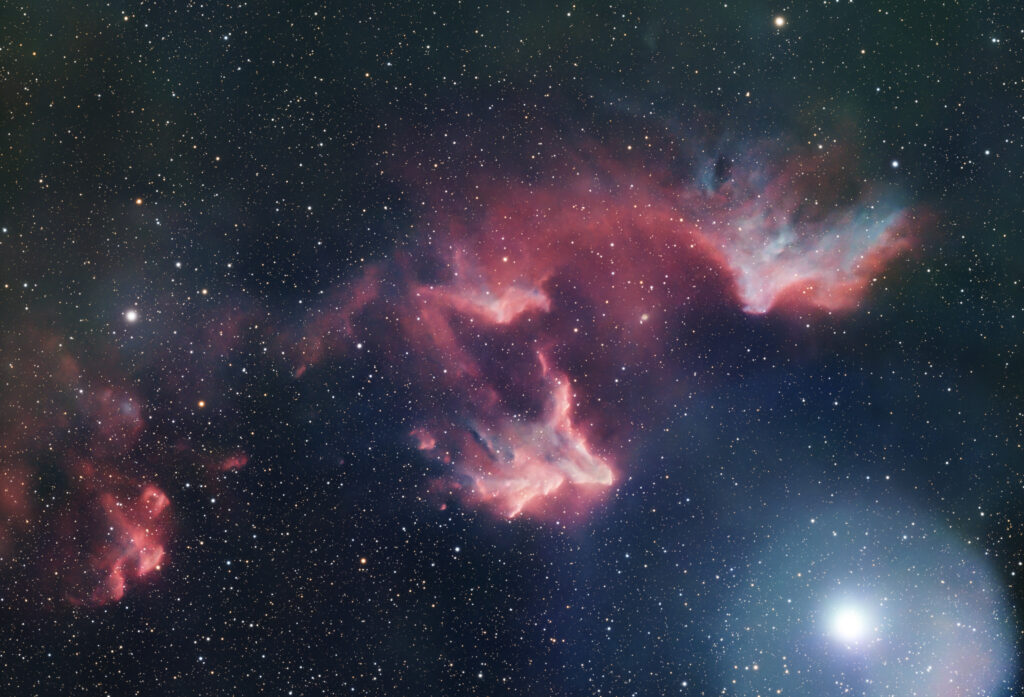
The Ghost of Cassiopeia has made its appearance just in time for Halloween!
Many thanks to all fourteen of the contributors to this, our second MAS Collaborative Project. Contributors include Bob Aloisi, Michael Brockman, Wil Cox, Frank Fetter, Jack Fitzmier, Terry Genske, Jordan Konisky, Alex Langoussis, Imogen McKenzie, Alex Samuel, Carol Santulis, Rob Strabala, Bonnie Tiedt, and Don Waller.
As you can tell from the photo, the project was a success! In fact, we gathered more data (174.1 hours of imaging from Seestar S50s, S30Pros, S50Pros, and one Dwarf Mini) than we did on the NGC 6166 project. Because the Ghost has elements of both emission and reflection nebula, we used exposures containing the smart scopes’ LP filters and clear (IRCUT) imaging. Our final total was 33% IRCUT and 67% LP (which contains both H-alpha and Oiii bands).
My special thanks go to two MAS members who handled the processing: John Rummel and Bob Hamers. Without their expertise and dogged determination, we’d have no Ghost! Each of them have added notes about the challenges they faced, and more importantly, overcame.
There is talk about a third Collaborative Project, so stay tuned!
— Jack Fitzmier
Processing the shot:
Starting with the wideband data using the IRCUT filter, the S50 master and the Dwarf Mini masters, with their smaller field-of-view, were aligned and stacked (integrated) together. The resulting image was slightly cropped to eliminate edge artifacts, then aligned with the S50Pro master image using Pixinsight’s Align by Coordinates script. Even though well aligned, merging these data initially proved difficult because the halo associated with the bright star (Gamma Cassiopeiae, or “Navi”) produced a pronounced seam when attempting to combine the data sets. To address this, I (and the AI agent Claude) wrote a Python program that adjusted the small field-of-view S50+S30Pro+Dwarf image with the large field-of-view S50Pro+S30Pro image to match the brightness, contrast, and, most importantly, edge gradients between the images. The gradient correction involved fitting the difference in background between the images to a 4th-order polynomial and subtracting this polynomial from the S50+S30Pro+Dwarf data set, thereby warping the background of the smaller-field-of- view image to match the existing background of the S50Pro image. The program then merged these images, weighting each based on its signal-to-noise, producing a seamless image that incorporated data from all the submitted wideband (IRCUT) images. This process was then repeated using the narrowband (LP filter) images.
While overall the “master” files produced using the S50Pro data alone had a higher signal-to-noise ratio than the corresponding S30+S50 masters, the signal-to-noise ratio produced by incorporating all the data was significantly larger than that of either one alone. This shows that all of the data, irrespective of the type of telescope used, contributed to increasing the quality of the final image.
— Bob Hamers
The two master files produced by Bob’s process as described above made the final editing steps easy. Each of the masters (IRCUT and LP filter) emerged from Bob’s editing fully color corrected with neutral backgrounds. I processed them in Pixinsight as follows:
- BlurXterminator
- StarXterminator (stars from the LP shot were discarded; stars from the IRCUT were lightly processed and stretched for later re-incorporation)
- NoiseXterminator
- Multiscale Adaptive Stretch
- Local Histogram Equalization (very light touch to boost local contrast of the nebular features in each shot)
- Saved both as TIFF for further editing in Photoshop

In Photoshop, the two filter shots and the stretched stars were imported as layers into a single document, stacked in the following order: stars, LP, and IRCUT. The layer blending modes were set as follows: stars to Screen and LP to Lighten. All cropping was completed in Photoshop. Curves adjustment layers were applied to both the LP and IRCUT layers to brighten features, enhance contrast, and slightly darken the background. A subtle Hue/Saturation adjustment layer was used to gently soften the reds and enhance the blues. Finally, a soft layer mask was painted with the Brush Tool to reduce the halo around the bright star Gamma Cassiopeiae. I flattened the image and brought it into the Camera Raw Filter for final noise reduction. I did a final Curves adjustment to add a little additional “pop.” The final version of the image can be seen at the top of this page.
— John Rummel
(Posted October, 2026 by Jack, Bob, and John)